Jenkins 企微群构建通知(@构建者)实现方法
一、概述
1.1 流程概述:
flowchart TD
  A["流水线结束 post.always"] --> B["生成构建状态 status/currentResult"]
  A["流水线结束 post.always"] --> Q["获取到构建用户名称 name"]
  B --> C["项目环境是否为:test 环境 PACKAGING_ENV == test?"]
  Q --> C["项目环境是否为:test 环境 PACKAGING_ENV == test?"]

  C -- "是" --> F["调用 wechat.notifyBuild"]
  C -- "否" --> G["跳过企业微信,开发环境 不生成构建通知"]

  F --> K["调用get-user-iphone.sh 脚本,解析用户名称,获取到手机号"]
  K --> L["拼接消息体 textPayload"]
  L --> M["curl POST webhook_url"]
1.2 环境前提概述:
需要维护一份人员名单,企微@群员 可通过手机号的方式,来@群员,所以手机号是唯一。
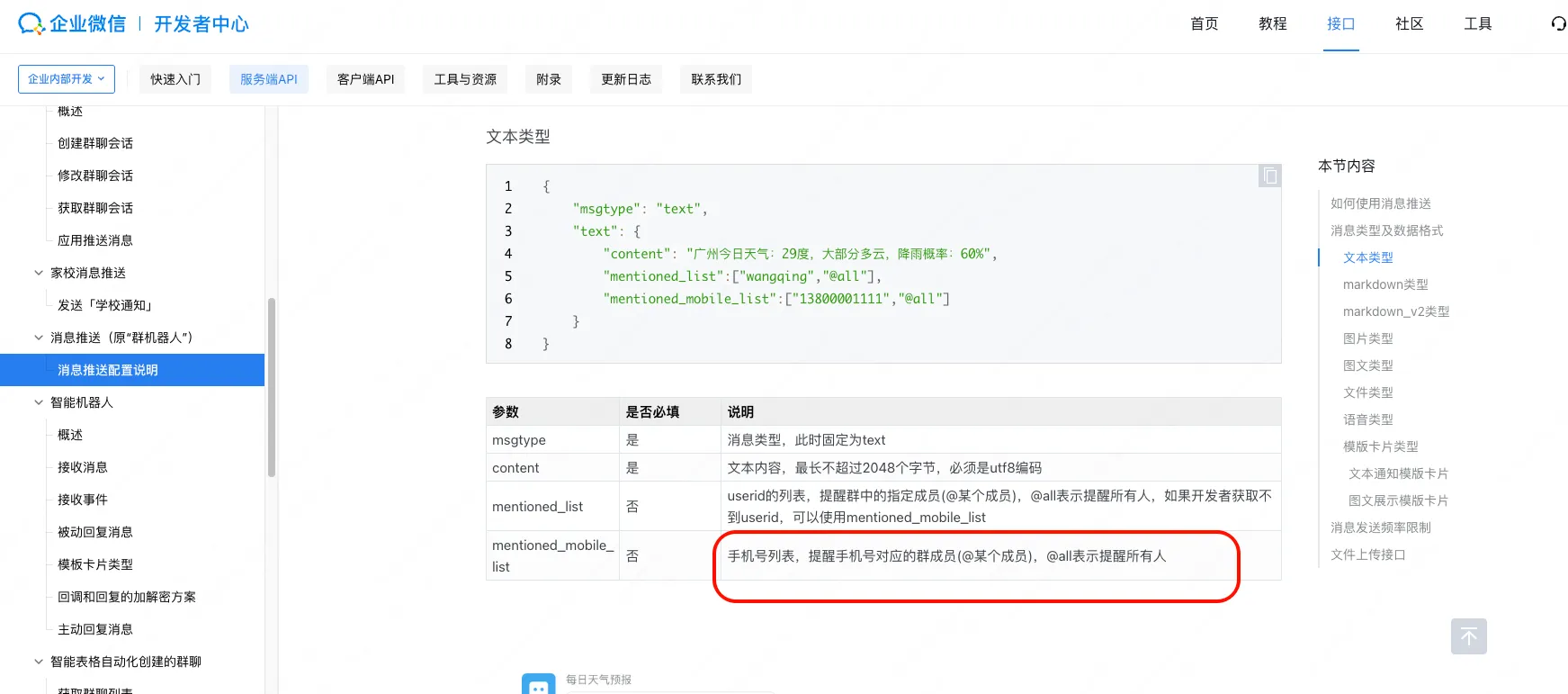
- 人员名单脚本:【存放在 jenkins 服务器上,方便流水线直接调用】
#get-user-iphone.sh

#!/usr/bin/env bash
set -euo pipefail

name="${1:-}"

case "$name" in
  "admin") echo "13000000000" ;;
  "张三") echo "13000000001" ;;
  "李四") echo "13000000002" ;;
  "王五") echo "13000000003" ;;
  *)
    echo ""
    ;;
esac
这里人员名单的用户名我们要维护好在 jenkins 上,这个用户名是 jenkins 上的全局唯一。
【关于如何批量创建用户,导入用户,可以参考:https://opforge.srebro.cn/devops/jenkins/09/09-1.html】
jenkins 流水线在构建结束之后 ,可以获取到 构建动作是哪个用户触发的。就执行这个脚本 来获取到对应用户的手机号,再执行 webhook 的发送构建通知动作。
二、实现步骤
本案例采用 jenkins 共享库的方式来实现
2.1 入口配置
Jenkinsfile 中通过 webhook_url 传入企业微信机器人 Webhook,并调用共享库入口:
def map = [:]
map.put('packaging_env','test')
map.put('webhook_url','https://qyapi.weixin.qq.com/cgi-bin/webhook/send?key=81abf299-9946-426a-827a-cef9a00de4ea')
map.put('git_credentials_id','xxxxxxxxxxxx')
map.put('default_branch','test')
map.put('project_choices', projectChoices)
map.put('project_config', projectConfig)

deploy_front(map)
2.2 通知触发位置
流水线在 post.always 里统一发送邮件与企业微信通知(仅 test 环境发送企业微信通知):
post {
  always {
    wrap([$class: 'BuildUser']) {
      script {
        if (!(params.SKIP_PIPELINE || (currentBuild.rawBuild?.getCause(hudson.triggers.TimerTrigger$TimerTriggerCause) != null))) {
          if (env.PROJECT_WORKSPACE) {
            ws(env.PROJECT_WORKSPACE) {
              cleanWs()
            }
          }
          def status = "${currentBuild.currentResult}"
          email.Email(status)
          if (env.PACKAGING_ENV == 'test') {
            wechat.notifyBuild(env.WEBHOOK_URL, [
              status: status,
              buildTime: env.BUILD_TIME,
              projectName: params.PROJECT_NAME,
              gitBranch: params.GIT_BRANCH
            ])
          }
        }
      }
    }
  }
}
2.3 手机号解析与 @人逻辑
通知对象基于 Jenkins 的构建者用户名 env.BUILD_USER:
- 优先调用 Jenkins 服务器上的脚本
/opt/application/get-user-iphone.sh获取手机号 - 如果脚本未返回手机号,则尝试读取
USER_MOBILE_MAP_JSON环境变量 - 再否则尝试读取工作区内的
user_mobile_map.json文件 - 得到手机号后,加入
mentioned_mobile_list,同时mentioned_list里包含用户名
脚本示例(Jenkins 服务器上):
#get-user-iphone.sh

#!/usr/bin/env bash
set -euo pipefail

name="${1:-}"

case "$name" in
  "admin") echo "13000000000" ;;
  "张三") echo "13000000001" ;;
  "李四") echo "13000000002" ;;
  "王五") echo "13000000003" ;;
  *)
    echo ""
    ;;
esac
2.4 企业微信发送实现
核心发送逻辑在共享库 org.devops.wechat:
def notifyBuild(webhookUrl, args = [:]) {
  def buildStatus = args.status ?: (currentBuild?.currentResult ?: 'UNKNOWN')
  def statusIcon = buildStatus == 'SUCCESS' ? '✅' : '❌'
  def buildUser = env.BUILD_USER ?: '系统自动'
  def projectName = (args.projectName ?: env.PROJECT_NAME)
  def gitBranch = args.gitBranch ?: (env.GIT_BRANCH ?: '')

  def resolveMobileForUser = { username ->
    def mobile = null
    try {
      try {
        def out = sh(script: """if [ -x /opt/application/get-user-iphone.sh ]; then /opt/application/get-user-iphone.sh '${username}' || true; fi""", returnStdout: true).trim()
        if (out) {
          mobile = out
        }
      } catch (e1) {
        echo "获取手机号失败: ${e1}"
      }
      if (!mobile && env.USER_MOBILE_MAP_JSON && env.USER_MOBILE_MAP_JSON.trim()) {
        def map = new groovy.json.JsonSlurper().parseText(env.USER_MOBILE_MAP_JSON)
        mobile = map[username]
      } else if (!mobile && fileExists('user_mobile_map.json')) {
        def json = readFile(file: 'user_mobile_map.json')
        def map = new groovy.json.JsonSlurper().parseText(json)
        mobile = map[username]
      }
    } catch (e) {
      echo "解析手机号映射失败: ${e}"
    }
    return mobile
  }

  def userMobile = resolveMobileForUser(buildUser)
  def notifyNames = new LinkedHashSet<String>()
  notifyNames << buildUser
  def notifyMobiles = new LinkedHashSet<String>()
  if (userMobile) {
    notifyMobiles << userMobile
  }

  def textPayload = [
    msgtype: "text",
    text   : [ content: "${statusIcon} 构建状态: ${buildStatus}\n项目名称: ${projectName}\n构建分支: ${(gitBranch ?: 'master')}" ]
  ]
  if (!notifyMobiles.isEmpty()) {
    textPayload.text.mentioned_mobile_list = notifyMobiles.toList()
  }
  textPayload.text.mentioned_list = notifyNames.toList()
  writeFile file: 'text_message.json', text: groovy.json.JsonOutput.toJson(textPayload)

  sh """
    curl -s -H "Content-Type: application/json" -X POST -d @text_message.json "${webhookUrl}"
    rm -f text_message.json
  """
}
三、最终效果
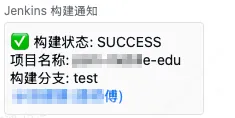
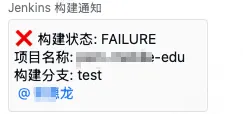
本文是原创文章,采用 CC BY-NC-ND 4.0 协议,完整转载请注明来自 运维小弟